PointCare
- 3.5
- Rating
- 10.00K
- Installs
- Free
- Price

 Analysis by App-foxy
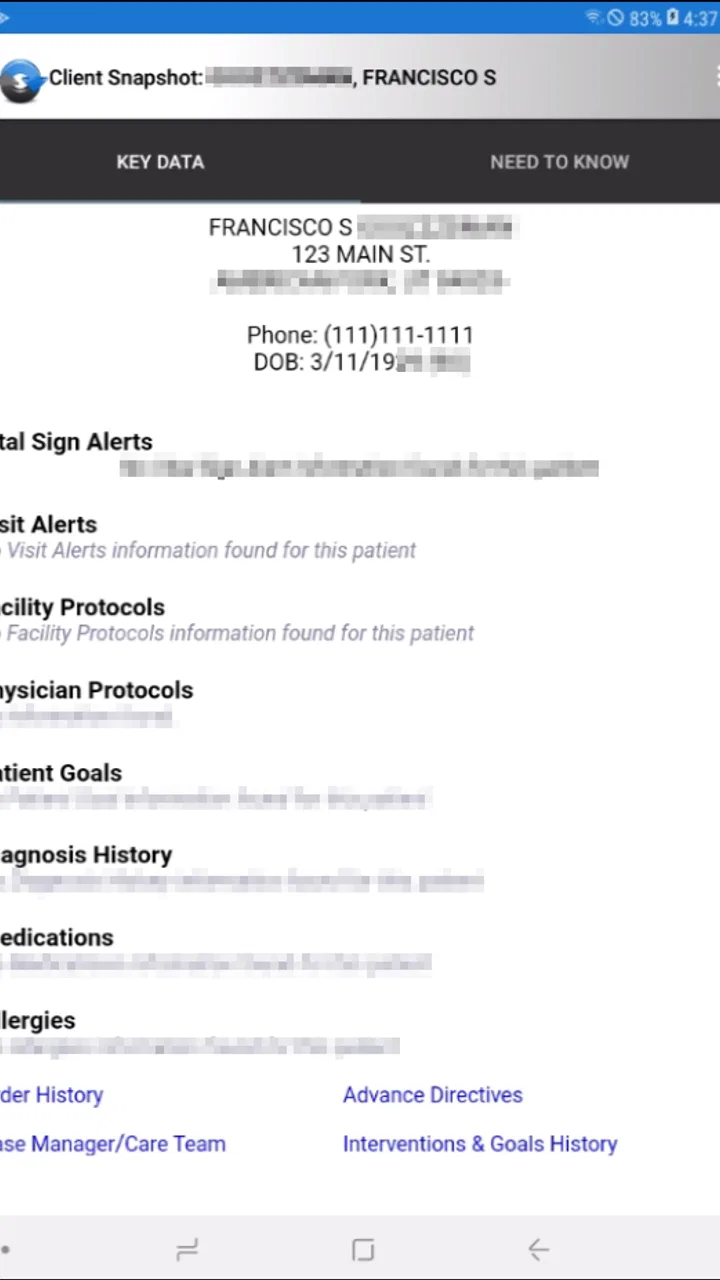
PointCare is the kind of medical app that makes sense only when you are already part of a specific care organization. I approached it less like a general health tool and more like a work companion for authorized users who need clinical visit information connected to the HCHB electronic medical record. That distinction matters from the first screen: this is not an app for patients browsing symptoms, tracking fitness, or arranging an independent appointment.
Developed by Homecare Homebase, LLC, PointCare is aimed at people whose daily work depends on accurate visit information. Its free price and Everyone content rating make it easy to find and install, but installation alone does not turn it into a usable medical record system. In my experience, the important question is not “Can I download it?” but “Does my organization use the HCHB EMR, and am I an authorized user?” If the answer is no, the app is unlikely to offer much practical value.
Where PointCare users usually get stuck
The biggest source of confusion is the gap between an app being available in an app store and an app being ready for a particular worker. PointCare provides clinical visit data to authorized HCHB EMR users, so access is tied to an existing professional workflow rather than a casual sign-up. Someone may install it successfully and still be unable to proceed because the account, organization, or authorization step belongs to an employer or care provider.
You May Also Like

 AccuWeather: Weather Radar
AccuWeather Review: A Quick, Clear Forecast for Everyday Decisions
For everyday plans, the best forecast is the one you can understand quickly. AccuWeather makes rain timing, radar, and local conditions easy to act on, with a few trade-offs.

 Hill Climb Racing
Why Hill Climb Racing Still Turns Crashes Into One More Run
A tiny car, a bumpy hill and one more upgrade: Hill Climb Racing keeps resurfacing because its simple chaos makes every near-miss feel personal.

 AliExpress - Shopping App
AliExpress Makes Global Shopping Feel Personal, but Shoppers Bear the Risk
AliExpress turns a global marketplace into a pocket-sized discovery engine. Its reach is useful, its shopping loop compelling, and its trade-offs easy to miss.

 Lords Mobile: Kingdom Wars
Lords Mobile Is a Kingdom-Building Routine, Not a Quick Match
A case-by-case verdict on the building, battles, device demands, and social commitments that make Lords Mobile rewarding for some players and exhausting for others.

 PDF Scanner app - TapScanner
TapScanner Makes Paperwork Easier to Capture, Check, and Share
TapScanner makes scanning with a phone feel less like a rescue operation and more like a dependable step in getting work done. Its capture tools are useful, though not flawless.

 Block Blast!
 Shows How Much a Puzzle Game Can Leave Out
A quiet grid game shows why puzzle players increasingly value instant clarity, repeatable skill and low-pressure play—and where the genre still needs to catch up.
More From Our News Desk
View All News


This is an important difference from ordinary medical apps. A medication reminder or symptom journal generally explains what a new user can do immediately. PointCare assumes that the user already understands the surrounding care process. If you are a home-care professional who has been told to use it, that focused design can feel appropriate. If you are a family member, independent caregiver, student, or patient looking for personal records, the same focus can feel like a locked door.
I would also avoid treating a blank, incomplete, or unexpectedly empty view as proof that the application is broken. Clinical visit information depends on the account and the organization behind it. A missing visit may reflect authorization, assignment, synchronization, or the timing of the record in the HCHB system rather than a problem with the phone application itself. That is why the first troubleshooting step should be identifying exactly which part of the workflow is failing.
There are three useful questions to ask before changing anything: can you open the app, can you authenticate as the expected user, and can you see the visit information you were meant to access? These are separate problems. Reinstalling the application may help with a damaged local installation, but it will not create authorization or repair a record that has not reached the connected system.
Separate access trouble from visit-data trouble
If PointCare closes, freezes, or refuses to load at all, the issue is probably at the application or device level. If it opens normally but does not show the expected clinical visit, the issue may be connected to the user account or the HCHB EMR workflow. Keeping those situations separate saves time and prevents a common mistake: repeatedly changing phone settings when the real correction must come from a supervisor or system administrator.
For a field worker, this distinction is especially valuable. Imagine arriving for a scheduled home visit and finding that the expected information is not visible. The safest response is not to guess at clinical details from an old screen or assume that an incomplete view is current. Check the account context, confirm the intended visit through the approved workplace process, and escalate the missing information through the organization. PointCare can support access to visit data, but it should not be treated as permission to improvise when the record is unclear.
Why the app can feel limited outside its intended setting
PointCare is not competing directly with broad consumer health platforms. Those alternatives are usually better for personal wellness, general education, appointment reminders, or storing information that a user enters independently. PointCare’s value is narrower: it belongs to a professional record workflow where the information is connected to authorized HCHB use.
That narrow purpose is both its strength and its limitation. A nurse or other authorized care worker may prefer a focused tool over a generic notes application because the relevant visit context is associated with the organization’s medical-record process. On the other hand, a user who wants offline personal copies, broad health tracking, or a patient-facing overview will probably find a general medical app more suitable. Installing PointCare for those purposes would be choosing the wrong category of tool.
Setup checks that prevent avoidable frustration
PointCare supports devices running Android 5.0 or later, and the current version is 26.9.1. Those requirements are modest enough for many older Android phones, but compatibility does not guarantee a smooth work session. Before relying on the app during a visit, I would open it on the actual device intended for field use and confirm that the organization’s expected account can reach the relevant clinical area.
Start with the basics, but do them in a useful order. Confirm that the device is connected to a dependable network, that the phone’s date and time are sensible, and that the application has finished installing rather than remaining in a partially updated state. Then launch PointCare and test the normal sign-in path used by your workplace. Avoid changing several things at once; otherwise, you will not know which change solved the problem.
The next check is account identity. Shared phones, work profiles, and multiple accounts can create a surprisingly simple failure: the app is open, but it is not being used under the identity that has access to the expected HCHB records. If the screen appears valid yet the visit list is wrong, compare the active user context with the account your organization assigned. Do this without entering another person’s credentials or trying to bypass access controls.
It is also worth confirming that you are looking for the right visit and the right type of information. Clinical workflows often involve several dates, assignments, and documentation stages. A visit that has not been assigned to the current user, or information that has not yet reached the connected record, may not appear where you expect. PointCare should be checked against the work instructions supplied by the care organization, not against assumptions from a different medical app.
A sensible first-day test
My preferred setup test is a short, non-urgent trial before the first real appointment. Open the application, authenticate normally, locate the expected area, and verify that the information shown matches the task you were given. Then close and reopen it once, because an app that works only on the first launch is not yet proven for field use. This small rehearsal exposes account and connectivity problems while there is still time to ask for help.
Keep the test focused on access and workflow rather than attempting to alter records simply to see whether controls respond. In a medical setting, unnecessary experimentation can create confusion about what was viewed or changed. The safest preparation is observational: confirm that the correct user can reach the correct information and that the device remains usable after a normal restart.
Because PointCare is free, cost is not the barrier to trying it. The practical investment is coordination. Your organization may need to explain how authorization works, which account to use, and who handles missing visit information. That support relationship is part of the product experience, even though it sits outside the app’s visible interface.
Privacy-minded habits for a work device
Clinical visit data deserves careful handling. I would use PointCare only on a device approved for the work context, keep the phone protected with its normal security controls, and avoid copying sensitive details into personal notes or screenshots. These are not decorative precautions; they reduce the chance that medical information ends up in an unrelated application or shared device area.
Be equally careful when troubleshooting in public. If a supervisor needs a description of an error, explain the screen and the timing without sending patient information through an informal channel unless your organization explicitly allows it. A useful report can say that the correct account opened the app but an expected visit was absent. It does not need to include unnecessary clinical details.
Recovering a workflow when something goes wrong
When PointCare does not behave as expected, I would use a gradual recovery sequence. First, note the exact symptom: failure to open, sign-in rejection, empty information, stale information, or an unexpected return to the previous screen. Next, close and reopen the app, verify the connection, and retry the normal workflow once. If the problem remains, record the time and the task you were attempting before contacting the appropriate workplace support channel.
This approach is safer than immediately deleting the application. Reinstallation can remove local state and may force you to repeat setup without fixing an authorization or server-side issue. It is reasonable to consider reinstalling only after the organization’s support process recommends it or after ordinary restart and connection checks have clearly failed at the device level.
If the app opens but the information is not current, do not assume that repeatedly refreshing or reopening will make an unsubmitted record appear. The record may depend on another step in the HCHB workflow. Confirm whether the visit was assigned, entered, or synchronized through the process your organization uses. If the information is clinically important and remains unavailable, follow the approved escalation route rather than relying on an old screen.
A practical recovery example
Consider a worker who opens PointCare before leaving for a visit and sees the app normally, but the expected clinical visit is missing. The useful sequence is to verify the active account, check the network, reopen the relevant view, and compare the visit details with the assignment received through the organization. If the visit is still absent, the worker should contact the designated coordinator or system support person and explain the precise mismatch.
What the worker should not do is borrow a colleague’s login, create an unrelated personal record, or treat a different visit as a substitute. Those actions may appear to get around the immediate obstacle, but they damage the reliability of the clinical workflow. PointCare is most useful when it is used as a controlled access point, not as a general-purpose workaround.
Another realistic case is a device that worked earlier but now will not load the app. Here, a restart and network check are sensible first actions. If other applications also struggle, the phone or connection may be the real cause. If only PointCare is affected, note whether the failure happens before or after authentication and pass that detail to support. A precise report is much more useful than saying only that “the app is broken.”
When PointCare is not the cause
It is tempting to blame the visible application because it is the part of the process on the phone. Yet PointCare sits within a larger chain involving the device, network, account, authorization, organization, and HCHB EMR information. A problem anywhere in that chain can look like an app problem to the person standing in front of the screen.
For example, an outdated assignment can produce an apparently missing visit. A user profile with the wrong role can produce a restricted view. A poor connection can make information appear delayed. A phone with limited available resources can make any work app feel unstable. These possibilities do not mean that every problem is external; they mean that troubleshooting should follow the symptom instead of assuming the cause.
The most important safety boundary is clinical judgment. PointCare can help an authorized user reach visit information, but it is not a replacement for the organization’s procedures, professional training, or direct escalation when the record is incomplete. If a care decision depends on information that is unavailable or inconsistent, stop and use the approved alternative communication path.
This is also where PointCare differs from a paper notebook or a generic notes app. A notebook may remain accessible without a network, and a notes app may be faster for personal reminders, but neither automatically represents the organization’s current clinical visit record. They can be useful as temporary operational aids only when workplace policy allows them, and they should not be treated as equivalent sources of truth.
Compared with a broad electronic health record interface, PointCare may feel more focused and less flexible. That can be an advantage on a phone when the task is centered on visit data. It can also be frustrating if your role requires wider chart review or functions that belong to another part of the HCHB environment. In that situation, the better option is not necessarily a different consumer app; it may be the official workflow or interface your organization assigns for that job.
Who should use it, and who should skip it
I would recommend PointCare to authorized HCHB users who need a mobile route to clinical visit information and who are willing to follow an organization-managed workflow. It is particularly relevant for staff who move between locations and need to check the information associated with their assigned work without turning to a general-purpose app.
I would skip it if you are looking for personal health management, a patient portal, symptom advice, medication reminders, or a standalone record that you control yourself. The app’s purpose is too specialized for those needs. I would also avoid depending on it as the only answer when your role requires broader documentation or when your organization has not clearly explained how access and support work.
The audience size appears specialized rather than mass-market: PointCare has passed ten thousand installs, with an average rating of three and a half from ninety-eight ratings and twenty-eight reviews. Those figures suggest a modest, mixed reception, but they do not tell me whether the app fits your workplace. For this product, organizational compatibility matters more than popularity.
My practical verdict after looking at the full workflow
PointCare is best understood as a focused medical-workflow tool, not a universal health application. Its free availability, support for Android 5.0 and later, and connection to the HCHB EMR make it a reasonable choice for the authorized people it serves. The developer, Homecare Homebase, LLC, has positioned it around access to clinical visit data rather than around consumer features, and that narrow purpose gives the app a clear role.
My main reservation is that the user experience depends heavily on factors outside the app. Authorization, account setup, assignment, synchronization, device condition, and workplace support all influence whether PointCare feels reliable. A new user who expects to install it and immediately browse records may be disappointed. A professional who receives clear setup instructions and tests the workflow before a visit is much more likely to find it useful.
The most practical advice is to treat setup as part of the job, not as a one-minute download. Confirm the correct account, test access before an urgent visit, learn who handles missing information, and keep a safe escalation plan for moments when the record is unavailable. Those habits address the real friction points more effectively than repeatedly reinstalling the app.
PointCare is worth choosing when your organization already relies on HCHB and has authorized you to use this mobile access point. It is not the right choice merely because you need a medical app. For the intended professional user, I see a focused tool whose usefulness comes from fitting into an established record system. For everyone else, a patient-facing or personal health application will be a better match.
At the time of review, the app is offered free of charge, carries an Everyone age rating, and is listed as version 26.9.1. Those details make trying it straightforward, but the final decision should rest on workflow fit. The key test is simple: can your authorized account reach the correct HCHB visit information when you need it? If yes, PointCare can be a practical part of mobile care work. If not, the next step is usually coordinated support rather than more experimentation on the phone.
FAQs for PointCare
01What is PointCare, and what is it used for?
PointCare is a mobile application designed to support healthcare-related workflows, particularly for users who need to access patient information, complete assessments, document visits, and submit care-related data while working outside a traditional office. Its exact features may depend on the organization using it, the user’s role, and the permissions assigned to the account. It is generally intended for authorized professionals rather than casual personal use.
02Who can use the PointCare app?
PointCare is typically intended for authorized healthcare workers, caregivers, field staff, or other professionals whose organizations use the platform to manage visits and clinical or administrative documentation. Downloading the app alone may not be enough to access its functions, since users commonly need valid login credentials provided by an employer, agency, or participating organization. Availability of specific tools can vary by account type.
03Does PointCare work without an internet connection?
PointCare may support workflows in locations where connectivity is limited, allowing certain information to be viewed or entered before it is synchronized later. However, offline capabilities can differ depending on the app version, device settings, and the organization’s configuration. Users should normally connect to a reliable network before submitting completed records, updating information, or performing actions that require real-time access to the service.
04Is PointCare safe for handling personal or patient information?
Because PointCare can be used for healthcare documentation, users should treat the information inside the app as sensitive and follow their organization’s privacy and security policies. Access is generally controlled through account credentials and assigned permissions, but security also depends on the user’s device, password practices, and software updates. Avoid sharing login details, use a protected device, and report suspicious activity to the responsible administrator.
05What should I do if PointCare does not work or I cannot log in?
If PointCare fails to open, freezes, or rejects your credentials, first check that your device has a stable internet connection, the operating system is supported, and the application is updated through the official app store. Restarting the app or device may also help. If the problem continues, contact your organization’s PointCare administrator or technical support team, since account activation, permissions, and server access are often managed externally.
Pros
- Simple interface makes patient information easy to access.
- Supports more organized care coordination between healthcare teams.
- Can reduce reliance on paper-based clinical records.
- Useful for reviewing patient details during field visits.
- May improve communication between providers and care staff.
Cons
- Availability and features may depend on your healthcare organization.
- Requires a stable internet connection for some functions.
- Users may need training before using advanced tools confidently.
- Handling sensitive health data raises privacy and security concerns.
- Performance can vary depending on device compatibility and system updates.

PointCare
Gallery